
Quick Summary: Confused between Salesforce customization and configuration? This guide breaks down both approaches, showing how tailored code, automation, and declarative tools can shape CRM to match your exact business workflows and goals without overcomplicating the system. Learn how to strike the perfect balance between flexibility, scalability, and maintainability for long-term growth.
There are two common buzzwords flying across the United States around Salesforce development services: Salesforce customization or Salesforce configuration. Since most clients want to go for Salesforce implementation that does exactly what they want it to be, whether buying the Salesforce platform for their small business or an enterprise-grade solution for a highly complex business, the client wants to meet the exact requirements.
However, the more complex the requirements, the less likely it is that a commercial Salesforce, off-the-shelf solution is going to come out of the box meeting those requirements. In order to meet the specific client requirements, Salesforce must either be customized or configured to meet the needs, or a combination of both. So, what is Salesforce customization, and what is Salesforce configuration? Let's find out in detail; however, first, let's understand the significance of this decision.
Why does this choice matter
Choosing between Salesforce configuration and customization matters most for aligning cost, maintenance, and speed with business requirements. Configuration uses the platform's built-in tools that facilitate faster, cheaper, and more easily maintainable solutions, but with limited flexibility. Wherein customization involves coding for complex, unique needs but incurs slightly higher costs, longer timelines, and periodic maintenance, potentially impacting future upgrades. Considering a strategic choice maximizes the value since it balances the need for custom functionality with resource constraints.
Now, to understand which approach fits your business, let's get an overview of Salesforce customization and configuration and learn which one delivers quick results affordably.
Overview of Salesforce customization
When off-the-shelf Salesforce features don't quite cut it, the best Salesforce customization company steps in to bridge the gap. Unlike simple configurations, Salesforce customization services involves tailoring the CRM at the code level, using Apex classes, Visualforce pages, Lightning Web Components (LWC), and API integrations. This allows businesses to build workflows, data models, and automation that directly match their unique operations rather than forcing teams to adapt to rigid software limits.
For business leaders, this isn't just about "making Salesforce look different." Customization helps organizations streamline sales pipelines, automate approval cycles, and integrate external systems like ERP, marketing automation, or accounting tools. That means less manual work, faster decision-making, and a CRM that works the way your teams already do.
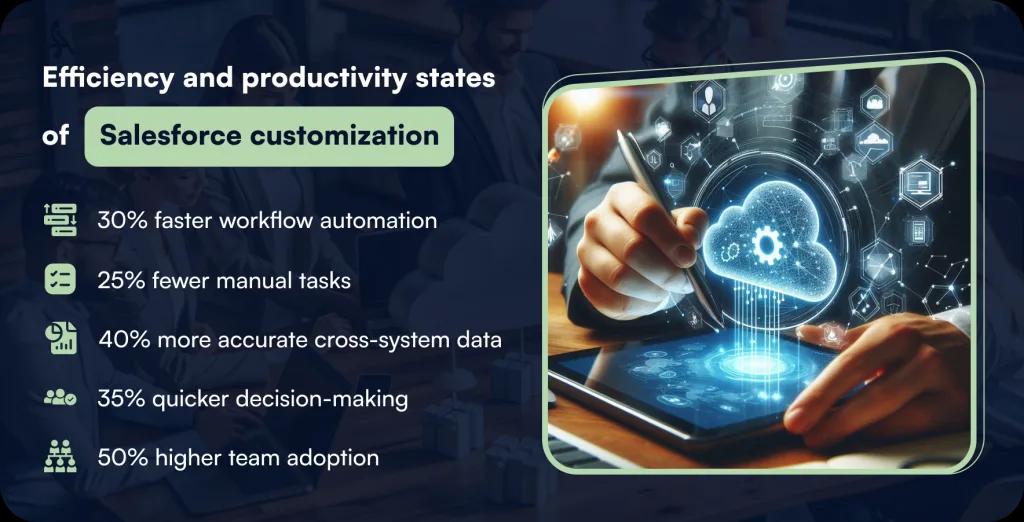
With customization, executives get real-time dashboards designed for their KPIs, predictive insights built on AI/ML add-ons, and customer journeys mapped to exact business goals. In short, Salesforce stops being just another tool; it becomes a growth engine that fits like a glove.
Overview of Salesforce configuration
Salesforce configuration services aim at adjusting built-in features to match how your business functions, without touching custom code. Think of it as fine-tuning the system so it runs smoothly for your team's day-to-day operations.
Using point-and-click tools, admins can set up custom objects, page layouts, record types, validation rules, and workflow automation. For example, you can tweak lead assignment rules, create approval flows for deals, or add dynamic dashboards that reflect exactly what your sales managers need to see.
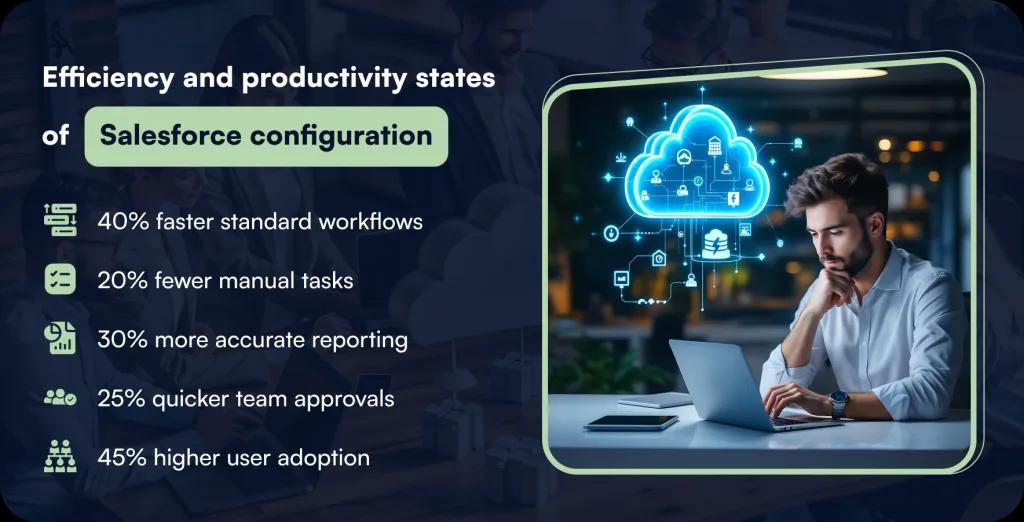
For business leaders, configuration means speed and cost-efficiency. Organizations across industries get a CRM that aligns with their sales, service, and marketing processes while keeping the platform stable and easy to maintain. It's the fastest way to adapt Salesforce development services without heavy development cycles or long project timelines.
In short, configuration gives you flexibility out of the box, so your teams stay productive, your data stays clean, and you see value in weeks, not months.
When to choose Salesforce customization
Complex business processes
If your workflows are too specific for out-of-the-box Salesforce, customization with Apex triggers, Lightning Web Components, and API calls makes sense. It lets you map every step of your business process directly into the CRM, so your sales and operations teams don't need to bend over backwards adapting to a one-size-fits-all setup.
System integrations needed
When your business relies on multiple platforms, ERP, marketing automation, or accounting tools, customization helps Salesforce talk to those systems seamlessly. Using REST and SOAP APIs, developers can build deep integrations, so data flows automatically. Business leaders get a unified view across departments. It eliminates silos and manual work, which means quicker decisions and fewer costly errors.
Unique data models
Standard objects like Leads and Opportunities only go so far. If your business tracks contracts, memberships, or subscription renewals differently, the leading Salesforce customization company of United States allows you to build custom objects and relationships. This makes Salesforce reflect your real-world business structure. Leaders benefit from accurate reports, reliable forecasting, and a CRM that mirrors the way revenue is actually generated.
Advanced automation needs
When simple workflow rules don't cut it, customization allows you to implement advanced automation using Apex logic or custom Lightning flows. This can handle complex approval chains, multi-step calculations, or predictive lead scoring. For business heads, that translates into faster deal cycles, less manual work, and a system that quietly does the heavy lifting behind the scenes.
Personalized user experience
If you want dashboards, page layouts, or customer journeys tailored exactly to your teams, customization delivers. Lightning Web Components allow custom interfaces, while role-based views ensure the right person sees the right data. Business leaders get productivity gains because employees work in a system that feels built just for them, leading to higher adoption rates and better results.
When to choose Salesforce configuration
Standard processes fit
If your business runs on industry-standard workflows, Salesforce configuration works best. With point-and-click tools, you can set up page layouts, validation rules, and workflow automation quickly. Business leaders benefit from a faster setup that requires little to no coding effort, meaning you get a functional system that aligns with your sales and service processes without long development cycles.
Quick implementation goals
When speed matters more than deep customization, configuration is the smart path. Features like record types, approval flows, and dashboards can be adjusted in days instead of months. For executives, this means faster adoption, faster ROI, and minimal disruption to daily operations. Your team gets a CRM that fits well enough to start delivering value right out of the gate.
Limited development budget
Not every company has the appetite for heavy coding projects. Therefore, Salesforce Configuration company lets you adjust Salesforce through built-in features without relying on Apex classes or custom integrations. It gives you cost efficiency because the platform can be tailored by an admin instead of requiring a full development team, making it a budget-friendly way to align Salesforce with everyday operations.
Easy maintenance needs
Configuration is the way to go when long-term simplicity matters. Adjustments like workflow rules or user permissions can be handled internally by admins without calling in developers. It helps organizations to reduce dependency on technical resources, lower maintenance costs, and have the flexibility to adapt Salesforce as the business grows. All without waiting on custom code updates or lengthy release cycles.
Rapid scalability goals
As your business grows, you may need a Salesforce development company's assistance in the United States to scale quickly without reinventing the wheel. Configurations like role hierarchies, custom fields, and automation rules allow the CRM to expand with minimal effort. Business leaders get a platform that scales at the pace of their company while keeping operational costs predictable and avoiding unnecessary complexity tied to custom-built features.
Blending Salesforce customization and configuration both for maximum impact
Balance speed and depth
With configuration, you get quick wins, while customization handles complex gaps. By combining both, you achieve a CRM setup that launches fast and grows deeper over time. For business leaders, this balance means immediate ROI plus the ability to handle unique workflows later, without restarting the entire implementation from scratch. It's speed without sacrificing long-term flexibility.
Smarter data management
Configuration makes data structured through objects, fields, and validation rules, while customization builds advanced relationships and integrations. Together, they create a single source of truth for executives. Leaders benefit by accessing accurate reports, predictive insights, and cross-departmental data without duplicate records or manual entry headaches. This blend supports strategic decisions based on clean, connected, and real-time business information.
Streamlined user experience
Personalizing layouts, dashboards, and approval flows is possible with Salesforce configuration, while customization adds role-specific interfaces through Lightning Web Components. When combined, employees get a CRM that feels natural yet powerful for executives, which translates into higher adoption rates, faster onboarding, and more productive teams because people actually enjoy using the system rather than fighting against rigid software limitations.
Scalable growth model
For immediate needs, configuration makes Salesforce adaptable, while customization allows it to grow with complex future demands. Combining both creates a scalable foundation where everyday processes run smoothly, but advanced features are available when growth requires them. It helps gain peace of mind knowing their CRM won't stall as the company expands. It can flex and scale at the right pace.
Reduced long-term costs
Over-relying on customization can drive up costs, while pure configuration may limit functionality. Combining both keeps expenses balanced: configuration handles what's simple, customization tackles what's strategic. Leaders benefit from predictable budgets, faster project timelines, and fewer reworks. In short, you get maximum impact with minimal waste. It helps deliver a Salesforce setup that's lean, cost-effective, and built for long-term success.
Salesforce customization vs Salesforce configuration - Comparative analysis
Choosing between configuration and customization isn't an either/or decision — it's about matching the right approach to your business goals, budget, and timeline. Below is a practical, hands-on comparison with the tools, examples, trade-offs, and extra considerations business leaders need to pick the right path (or blend both).
Core difference — short and sharp
Configuration - Point-and-click setup inside Salesforce (no code). Use Setup, Object Manager, Flow Designer, Lightning App Builder, Reports, and Permission Sets to adapt the platform fast.
Customization - Code and developer work (Apex, Lightning Web Components, REST/SOAP/Bulk APIs, metadata packages). Use when the built-in controls can't meet a specific requirement.
How does it help - Configuration gets value right out of the gate; customization delivers fit-for-purpose features when your business model demands it.
Tools and technologies to know
Configuration (declarative)
- Set up UI - Custom objects, fields, page layouts, compact layouts.
- Flow Builder - Complex point-and-click automation and screen flows.
- Schema Builder, Reports & Dashboards, Data Loader (or Data Import Wizard), Permission Sets, Record Types.
Customization (programmatic)
- Apex (triggers, async jobs), Lightning Web Components (LWC) for custom UI.
- REST, SOAP, Bulk APIs, and Platform Events for integrations.
- Salesforce CLI / SFDX, VS Code with Salesforce extensions, metadata API, unlocked/managed packages.
- CI/CD tools (Git + pipelines, Gearset/Copado/other tools).
How does it help - knowing the toolset clarifies time, cost, and staffing needs, admins can handle many config tasks, while dev teams or partners are needed for code work.
Real world examples of Salesforce customization and configuration
When configuration wins
- Adjusting page layouts by role so sales reps see what matters.
- Building approval processes and dashboards for pipeline oversight.
- Creating custom objects to track simple business entities (events, campaigns).
When customization wins
- Deep integrations to an ERP with complex sync rules and failure handling.
- Custom quote engines or multi-currency billing logic that requires server-side processing.
- Tailored Lightning components for a unique user experience or embedded partner portal.
How does it help - Examples translate technical choices into business outcomes, faster closes, fewer manual handoffs, or system behavior that matches your contracts and revenue rules.
Pros & cons
Configuration
- Pros - Faster delivery, lower upfront cost, easier handoffs to admins, lower maintenance complexity.
- Cons - Limited for very unique workflows or heavy integrations; complex requirements may need workarounds.
Customization
- Pros - Full control, can model specialized processes, supports advanced integrations and unique UX.
- Cons - Higher upfront cost, longer delivery, needs developer skills, ongoing maintenance and release management.
How does it help - weigh quick wins vs long-term fit, configuration is usually the best first step; customization is an investment when you need differentiation.
Key technical considerations
- Platform limits & governor rules — Design to avoid hitting API, CPU, or SOQL limits; architecture choices directly affect reliability and cost.
- Testing & quality — Apex requires unit test coverage; automated testing becomes critical for custom code.
- Release management — Use sandboxes, source control, CI/CD and deployment strategies (change sets vs packages) to avoid regressions.
- Data migration & integrity — Complex mappings and deduping often demand staged ETL tools and a well-planned cutover.
- Security & sharing model — Profile vs permission sets, field-level security, and record-sharing decisions impact data access and compliance.
- Performance & monitoring — Custom code needs logging, error handling, and performance checks; config changes can also affect reports and dashboards.
- Skill availability & vendor choice — Admin skills are easier to source; high-quality Salesforce dev talent is pricier and in demand.
- Cost of ownership — Customizations carry maintenance, refactor, and upgrade costs; factor in multi-year TCO, not just the first deliverable.
- AppExchange & third-party options — Sometimes a vetted managed package gives faster ROI than custom builds.
- Governance & documentation — A clear change control board and documented design prevent technical debt.
How does it help - These are the things that bite budgets later, plan for them upfront and you'll avoid surprise bills and stalled projects.
Practical decision framework
- Start with config-first when processes align with industry standards or you need fast ROI.
- Add customization when configuration hits limitations: unique logic, heavy integrations, or a distinctive UX requirement.
- Use a hybrid approach when you want quick wins first and controlled extensions later. Build a modular architecture so custom components can be reused.
How does it help - A staged approach gets results quickly while preserving the ability to scale and differentiate.
Quick checklist for executives
- What are the non-negotiable business rules that must exist in the CRM?
- Which outcomes need to be delivered in 30–90 days vs 6–12 months?
- Do we have in-house dev skills or need a partner?
- What's our tolerance for ongoing maintenance and technical debt?
- Are there compliance or audit requirements driving design?
- Can an AppExchange package solve this faster and cheaper?
How does it help - These questions turn technical trade-offs into business decisions you can act on.
Configuration and customization are two sides of the same coin. Configuration gets your teams moving fast and delivers measurable wins; a Salesforce customization company in USA fills the gaps when your business model demands it. The most effective programs utilize both approaches and begin with declarative changes to make a significant impact quickly, then apply targeted customization where the business case is clear and measurable. Plan for governance, testing, and total cost of ownership up front so the CRM remains a true business asset.
How can I decide between Salesforce customization and Salesforce configuration?
Deciding between Salesforce customization and configuration comes down to balancing speed, cost, and how unique your business processes really are. Business leaders need to weigh technical depth, integration demands, and future growth plans to choose the right path or blend both for maximum impact. Here are five key areas to consider.
Process complexity
If your workflows fit standard Salesforce features, configuration through page layouts, record types, and Flow Builder often does the job. When processes are highly specialized like complex pricing models or multi-tier approvals, customization with Apex or Lightning Web Components delivers a better long-term fit.
Integration demands
Handling simple data import/export with tools like Data Loader, configuration would be the ideal choice. However, when you need Salesforce to talk seamlessly to ERP, finance, or custom apps, comprehensive Salesforce customization services with APIs, middleware, and event-driven integrations become necessary. Leaders gain a 360-degree view without manual entry or silos.
Budget and timeline
Configuration is quicker and more cost-effective since admins can implement it with point-and-click tools. Customization requires developers, longer sprints, and higher spend. For executives, the decision often depends on whether the priority is faster ROI or building unique features that justify a bigger investment.
User experience
Salesforce configuration company allows role-based dashboards, page layouts, and approval flows, while customization enables custom interfaces and dynamic workflows using LWCs. Together, they influence adoption rates. Businesses benefit when employees get a CRM that feels intuitive, leading to higher productivity.
Long-term scalability
For standard growth, configuration scales well, but as your company expands and business models become more complex, customization future-proofs your Salesforce org. Leaders who plan a hybrid strategy, configure first, then customize where it matters, see better cost control and smoother expansion.
Best practices for Salesforce customization and configuration
Getting the Salesforce solution right means finding a middle ground between configuration and customization. While configuration helps you adapt the platform quickly using point-and-click tools, the Salesforce customization company delivers advanced logic and integrations with Apex, LWCs, and APIs. For businesses across industries, following best practices ensures faster ROI, cleaner data, higher adoption, and a CRM that supports both today's needs and tomorrow's growth.
Start with the configuration first
Before writing code, explore what the Salesforce customization service provider in USA offers out of the box. Use tools like Flow Builder, Object Manager, and Reports to handle most workflows. This approach saves time, cuts costs, and gives your team immediate value. You get benefits from a quicker rollout while reducing technical debt and avoiding unnecessary long-term maintenance expenses.
Use customization for edge cases
Save customization for scenarios where configuration falls short. Examples include complex pricing models, advanced approval chains, or deep integrations with ERP systems. Developers can use Apex triggers, Lightning Web Components, and APIs to fill those gaps. You gain a CRM that mirrors unique business processes without overspending on code-heavy work for standard requirements.
Plan for scalability
Always design with growth in mind. Configuration should handle everyday processes, while customization builds reusable, modular components. Using managed packages, CI/CD pipelines, and version control ensures your org scales without breaking existing functionality. Leaders appreciate predictable expansion costs and a platform that won't stall as the company grows into new markets or product lines.
Prioritize data integrity
Both configuration and customization should enforce clean data. Use validation rules, duplicate management tools, and custom logic to keep records accurate. Consider integrating third-party ETL tools when moving data between systems. For executives, reliable data translates directly into accurate forecasting, stronger decision-making, and better customer insights without second-guessing what's in the reports.
Invest in governance and training
A well-governed Salesforce org avoids confusion and technical debt. Document every config and custom change, set clear approval processes, and align updates with Salesforce's release cycles. Train admins and end-users regularly, so adoption stays high. It helps businesses since the platform runs smoothly, new features are used effectively, and costly reworks are kept off the table.
Expertise required for Salesforce customization and configuration
Running Salesforce effectively isn't just about turning features on; it takes the right expertise to configure and customize the platform in a way that truly fits your business. Leaders who understand the skill sets involved can plan budgets better, staff smarter, and avoid hidden costs. Here's a breakdown of the expertise required on both sides:
Configuration expertise
Configuration work is typically handled by Salesforce Administrators or Business Analysts. They need strong skills with point-and-click tools like Flow Builder, Object Manager, Reports & Dashboards, and Permission Sets. These experts know how to shape data models, build approval processes, and set up user access. For business leaders, this means faster adoption, cleaner workflows, and quicker ROI, without expensive development cycles.
Customization expertise
Customization requires you to hire Salesforce developers and Solution Architects in USA. They bring deep industry knowledge of Apex, Lightning Web Components (LWC), API integrations, and deployment tools like Salesforce CLI or CI/CD pipelines. This expertise is critical when you need to integrate ERP, handle advanced logic, or build unique user interfaces. Leaders benefit because these specialists make Salesforce align with complex business processes rather than forcing a workaround.
Hybrid skill sets
Some organizations lean on professionals with both admin and dev skills, often called "Admin-Developers." They can manage routine configuration while also managing smaller custom tasks like Apex triggers or simple API calls. For executives, this hybrid role reduces dependency on multiple vendors and keeps costs manageable while still meeting unique requirements.
Change management and governance
Beyond admins and developers, you need roles like Project Managers, QA Testers, and Change Managers. They make sure every change, whether config or custom, goes through proper testing, documentation, and release planning. It minimizes risk, reduces downtime, and keeps Salesforce aligned with company goals as it evolves.
Partner and vendor expertise
When internal teams lack bandwidth, many organizations bring in Salesforce Consulting Partners. These vendors let you hire certified Salesforce developers, architects, developers, and admins who've done similar projects before. You get access to best practices, specialized expertise, and predictable delivery, turning Salesforce into a reliable business system without stretching internal resources too thin.
Let's decide what your business needs between Salesforce customization and configuration
Every business is unique, and so is the way it should use Salesforce. If your workflows fit standard CRM practices, like basic lead management, approval processes, and dashboards, configuration is often the best route. Using point-and-click tools such as Flow Builder, Object Manager, and Reports, admins can quickly adapt Salesforce to their business needs without writing code. For executives, this means faster deployment, lower upfront cost, and a platform your teams can adopt immediately. Configuration also simplifies maintenance, reducing long-term support efforts while delivering measurable ROI in weeks, not months.
Sometimes, standard features just won't cut it. If your business requires complex logic, multi-system integrations, or unique user experiences, partnering with the best Salesforce customization company is the right path. You can hire Salesforce developers to tailor Salesforce to mirror your exact business model. Customization provides full control over processes, data, and workflows. It allows your CRM to handle edge cases and advanced scenarios. While it requires more investment in time and resources, it future-proofs your platform and supports growth without forcing teams to compromise or rely on manual workarounds.
So, now let's make up your mind - Salesforce Customization or Configuration!
Related articles
- Top 9 Salesforce development companies in the USA—an updated guide for Q4 2025
- Salesforce development lifecycle: Processes, models, and challenges
- The strategic role of Salesforce development services in digital transformation

Written by
Pratik Kantesiya
AI Engineering Lead
Pratik leads AI engineering at Agile Infoways, where he architects production AI systems for enterprises across healthcare, BFSI, and logistics. He writes about practical AI delivery — what works, what does not, and what most teams miss between proof-of-concept and production.