Quick summary: Know the full potential of Salesforce with our expert Salesforce migration and data management strategies. From data cleansing to workflow automation, integration, and user adoption, this guide covers every step to streamline operations, reduce costs, and boost performance. Read the detailed guide now and learn how to manage risks, optimize workflows, and leverage analytics to maintain long-term business growth and operational excellence.
Time is of the essence, which a Salesforce migration company understands very well. And, it covers all areas of enterprise functions across various industries. Moreover, it allows businesses to lower their cost, improve their controls, increase their productivity, and make the most of every success. Therefore, companies should start their Salesforce transition now, and there are a million good reasons to do so. Transitioning to a modern Salesforce CRM solution that adapts to your dynamic needs can improve business performance.
Why Salesforce Migration? Why Now?
"If it isn't broken, don't fix it" may not cut it much longer for organizations aiming to be a catalyst. Since many organizations still choose to be on the sidelines, soon their siloed technologies may become stranded assets, receiving only mandatory updates from the vendor. They'll be forced around the core system or custom-build capabilities around business functionalities, only to end up throwing away those investments when there's no choice left.
To make things even worse, poorly managed migration takes an eternity and is fraught with cost overruns. And, of course, all these contribute to negative client and employee experience. Therefore, the better way would be to choose the best Salesforce migration services to free up your teams' capacity, support your teams' growth, design a business-specific solution, execute a high-impact plan, and build a sustainable model to streamline processes, reduce cost, increase adaptability, and preserve the investment value over the long run.
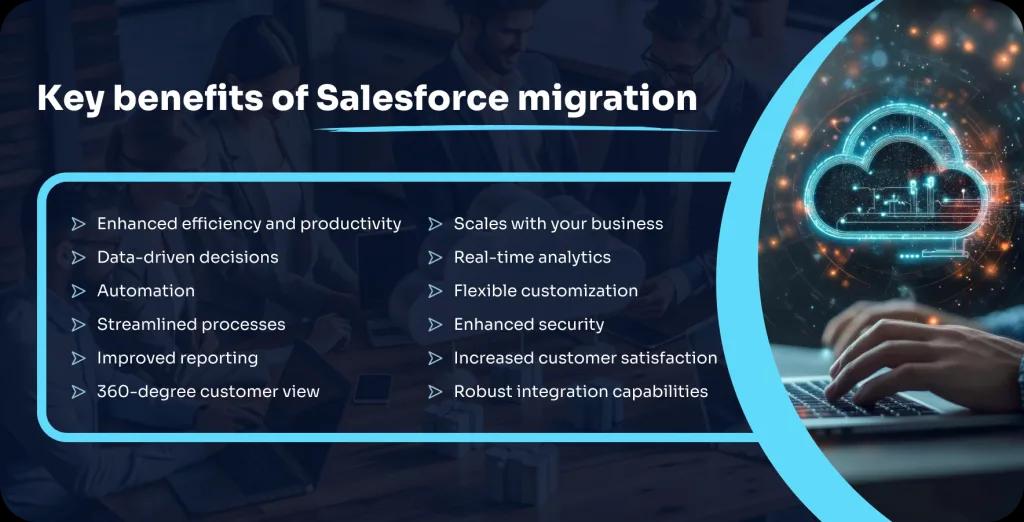
Businesses can confidently navigate the complexities of Salesforce migration while tapping into new efficiencies and innovation opportunities to drive business forward for the next generations. Additionally, with a leading Salesforce migration company, you get automated migration tools to streamline data and metadata deployment, along with strategic guidance, like migration to Salesforce Lightning, ensuring near-zero cost migration.
However, choosing the correct Salesforce migration type is essential since it dictates your strategy, resource allocation, and timeline, ultimately determining your project's success. So, let's start by getting the basics clear on Salesforce migration by understanding the types of it and later move on to the ins and outs of Salesforce migrations.
Types of Salesforce Migration
Salesforce migration isn't a one-size-fits-all move. Depending on your business size, data complexity, and system maturity, the Salesforce migration type can vary. From full-scale transitions to focused data shifts, understanding which approach fits your goals helps minimize risk and speed up adoption while maximizing ROI from Salesforce's cloud ecosystem.
Full Migration vs. Partial Migration
A full migration involves moving all business data, users, and processes from legacy or existing platforms to Salesforce in one go. In contrast, a partial migration focuses on specific modules or departments, such as sales, marketing, or customer service, while others remain on legacy systems. The right choice depends on your system readiness, data volume, and how tightly integrated your current platforms are.
Ideal Scenarios
- Full - When you're retiring a legacy CRM or consolidating multiple systems.
- Partial - When you want a gradual shift or pilot deployment before full rollout.
Key Benefits
- Centralized operations on one platform
- Simplified data management and workflows
- Reduced dependency on outdated systems
- Streamlined user experience across teams
Data Migration vs. Application Migration
Data migration focuses solely on transferring business data, such as leads, accounts, or transactions, from legacy systems into Salesforce. Application migration, however, includes moving both data and custom business logic, workflows, and integrations. While Salesforce data migration boosts analytics and reporting, application migration provides a more comprehensive shift to Salesforce's ecosystem. It helps preserve business automation and app functionality.
Ideal scenarios
- When only CRM data needs to be centralized in Salesforce.
- When apps, workflows, and APIs also need to be moved.
Key benefits
- Consistent and reliable data availability
- Improved data security and scalability
- Enhanced performance of integrated apps
- Faster access to business insights
Legacy System to Salesforce
Hire Salesforce developers to move legacy platforms like Siebel, Zoho, or custom CRMs to Salesforce helps modernize business operations. It involves re-mapping old data structures, automating outdated workflows, and adopting Salesforce-native features like Einstein AI, Lightning, and AppExchange tools. This type of migration focuses on eliminating technical debt and bringing enterprise data into a future-ready cloud environment.
Ideal scenarios
- When current systems can't handle modern data volumes
- When integrations or analytics are limited in legacy tools
Key benefits
- Enhanced automation and analytics capabilities
- Better performance and uptime reliability
- Easier maintenance and reduced IT overhead
- Access to Salesforce's latest updates and innovations
Moving From On-Premise to Cloud
This migration moves CRM and business apps from on-site servers to Salesforce's cloud environment. It offers better scalability, lower infrastructure costs, and stronger security compliance. Businesses shifting to cloud-based Salesforce also gain faster updates, mobile access, and native integration with third-party tools. The move demands careful data planning, robust security mapping, and testing to prevent downtime or data loss.
Ideal scenarios
- When managing on-prem servers becomes costly or complex
- When remote access and scalability are top priorities
Key benefits
- Lower maintenance and hardware expenses
- Real-time access from any device
- Automatic system updates with minimal downtime
- Improved collaboration across distributed teams
Planning Your Salesforce Migration Strategy
A proven Salesforce migration strategy sets the foundation for success. It's not just about moving data since it's about building a roadmap that aligns Salesforce with your business goals. It helps setting clear objectives, preparing data, defining roles, timelines, and budgets, every step helps reduce risk, speed up adoption, and drive measurable results after go-live.
Defining Migration Goals
Before starting, clearly define what you want the best Salesforce migration company to deliver: better lead tracking, improved customer visibility, or stronger automation. Set measurable objectives like data accuracy rates or faster deal cycles. Align these goals with your core business outcomes so that the migration doesn't just modernize systems but drives tangible performance improvements across departments.
Assessing Your Current System & Data
A thorough system audit helps identify what to migrate, clean, or retire. Review data sources, storage formats, user access, and integration points. Pay close attention to duplicates, outdated records, and field inconsistencies. This step helps you create accurate data maps and migration blueprints that reduce post-migration challenges and improve long-term Salesforce usability.
Identifying Stakeholders and Key Roles
Successful Salesforce migrations depend on people as much as platforms. Identify business leaders, IT admins, data analysts, and Salesforce specialists early on, or simply hire Salesforce developers. Define who owns data accuracy, testing, user training, and decision-making. Clear role assignment keeps communication transparent and prevents last-minute delays during critical stages like testing or deployment.
Setting a Realistic Migration Timeline
Timelines should balance speed with accuracy. Break the Salesforce migration process into phases: discovery, data cleanup, testing, and go-live to manage complexity. Account for dependencies like third-party integrations or API limits. Avoid overly aggressive deadlines that can cause data errors or user frustration. A realistic schedule improves coordination and helps teams hit each milestone with confidence.
Budgeting for the Salesforce Migration
Plan your budget around both visible and hidden costs, data tools, integration connectors, user training, testing environments, and post-go-live support. Include contingency funds for unexpected data cleanup or system issues. A clear budget prevents overspending and gives leadership a transparent view of ROI. It helps them make informed decisions about future Salesforce enhancements.
Data Preparation and Cleansing
Data preparation is a critical foundation for a smooth Salesforce migration. Before moving to the new platform, your data must be accurate, consistent, and well-structured. This phase focuses on removing duplicates, fixing incomplete records, and aligning data formats, so your Salesforce environment performs efficiently and supports reliable analytics from day one.
Why Data Quality Matters for Salesforce Success
High-quality data drives better decisions, stronger automation, and improved user adoption within Salesforce. Poor or inconsistent data leads to reporting errors, missed sales opportunities, and unreliable customer insights. By investing in data cleansing before migration, organizations can minimize integration issues, enhance forecast accuracy, and achieve faster ROI post-deployment.
Here's Why Clean Data Is Crucial for Salesforce Success
- Accurate analytics - Reliable data supports trustworthy reports and dashboards.
- Efficient automation - Smooth workflows and triggers rely on clean input data.
- Improved customer engagement - Personalized campaigns need complete and consistent customer records.
- Reduced duplication - Eliminates redundant contacts and records that waste storage and time.
- Better forecasting - Accurate opportunity data strengthens revenue predictions.
- Seamless integrations - Clean data minimizes sync errors across connected systems.
- Faster user adoption - Teams trust and rely on Salesforce when data quality is strong.
Common Data Issues and How to Resolve Them
Data challenges often surface during Salesforce migration, impacting accuracy, usability, and performance. Identifying and fixing them early prevents post-migration chaos.
Frequent issues and fixes
- Duplicates - Use data deduplication tools to merge or remove repeated records.
- Incomplete fields - Enrich missing data through third-party enrichment APIs or manual cleanup.
- Inconsistent formats - Standardize date, address, and contact formats using validation rules.
- Outdated entries - Archive or delete old leads and inactive accounts.
- Incorrect mappings - Review field mapping before migration to prevent misplaced data.
Data Mapping and Field Mapping Strategies
Data mapping connects your source system fields to Salesforce fields, allowing data to move accurately. Begin by cataloging your existing data sources, defining field names, and identifying relationships between objects. Create a detailed mapping document that includes source field, destination field, data type, and transformation logic. Testing a small data batch first helps confirm accuracy before full migration.
Tools and Technologies for Data Cleansing
Modern tools simplify data profiling, validation, and cleanup before Salesforce migration.
Popular tools and their purpose
- Salesforce Data Loader - For bulk import, export, and update of records.
- Informatica Cloud Data Wizard - Automates cleansing and transformation tasks for Salesforce data.
- Talend Data Preparation - Helps identify duplicates and format inconsistencies visually.
- DemandTools - Offers mass data correction, merging, and record standardization within Salesforce.
- OpenRefine - Cleans large datasets and helps detect anomalies.
- Data Import Wizard (Salesforce) - Simplifies import and validation for smaller data volumes.
- Reltio or Ataccama - Used for enterprise-level master data management and deduplication.
Choosing the Right Salesforce Edition for Your Business
Selecting the right Salesforce edition is a key decision that impacts performance, scalability, and overall ROI. Each edition offers different levels of features, automation, and customization. Whether you're a startup exploring CRM adoption or an enterprise optimizing complex workflows, understanding these editions helps you invest in the platform that truly fits your business needs and growth goals.
Comparing Salesforce Editions: Essentials, Professional, Enterprise, & Developer
Salesforce offers multiple editions to fit different business scales and requirements.
- Essentials - Best for small teams starting with CRM. Includes basic sales and customer management features with easy setup.
- Professional - Adds advanced reporting, forecasting, and automation tools—ideal for growing businesses managing multiple pipelines.
- Enterprise - Designed for mid-to-large organizations needing deep customization, process automation, and advanced integrations.
- Developer - Free edition for developers and IT teams to build, test, and experiment with Salesforce features before deployment.
Pro tip - Choose Salesforce editions based on your team size, data complexity, and the level of automation you plan to implement.
Evaluating Customization Needs and Scalability
Customization defines how well Salesforce fits your workflow. Small businesses may only need custom fields and reports, while larger organizations might require complex automation, role hierarchies, and API integrations. When evaluating scalability, consider user limits, data storage capacity, and integration flexibility. A scalable edition supports future growth without the need for major system changes later on.
Which Edition Fits Your Industry Best?
Salesforce editions can align closely with specific industry needs:
- Small businesses & startups - Essentials—simple, affordable, and fast to deploy.
- Mid-sized enterprises - Professional—balances automation with affordability.
- Large corporations - Enterprise—robust customization, workflow automation, and advanced analytics.
- Technology & consulting firms - Developer—ideal for building, testing, and extending Salesforce apps.
By matching your edition to your industry's workflow demands, you can gain better performance, cleaner data management, and a more streamlined sales process.
Salesforce Data Migration Best Practices
Data migration is one of the most critical steps in a Salesforce implementation. It involves transferring, validating, and optimizing data from existing systems to Salesforce without losing integrity. Following best practices helps reduce data loss, maintain consistency, and deliver a clean, usable CRM environment that supports automation, analytics, and decision-making right from day one.
Step-by-Step Guide to Data Migration
A structured approach keeps your migration accurate and organized.
- Data audit - Identify all data sources and categorize data types.
- Data cleansing - Remove duplicates, fix incomplete records, and validate accuracy.
- Field mapping - Match source fields with Salesforce fields to maintain relationships.
- Test migration - Migrate a small data set to check structure and format.
- Full migration - Execute bulk migration after testing is successful.
- Validation - Verify migrated data for completeness and accuracy.
- User access & permissions - Reconfigure roles and access rights for the new environment.
Salesforce Data Migration Tools and Strategies
Handling large datasets in Salesforce requires the right tools and approach.
Tools
- Salesforce Data Loader: Ideal for importing and exporting bulk data.
- Informatica Cloud: Offers advanced ETL capabilities for structured data migration.
- Jitterbit Data Loader: Enables seamless data movement with user-friendly mapping.
- Talend: Supports data transformation, cleansing, and synchronization.
Strategies
- Break data into smaller, logical batches.
- Schedule migrations during low-traffic hours.
- Use API-based migration for large, automated data loads.
- Monitor error logs and rerun failed batches for accuracy.
Testing and Validating Data Integrity Post-Migration
Once data is moved, validation confirms accuracy and usability. Compare record counts, field values, and relationships between old and new systems. Use Salesforce reports and SOQL queries to verify migrated records. Test critical functions, like lead assignment, workflows, and reports, to confirm data behaves as expected. Regular audits post-go-live help maintain ongoing data consistency.
Handling Large Volumes of Data Efficiently
For large enterprises with millions of records, performance and load optimization are key. Use bulk APIs to process data in chunks. It reduces timeouts and load failures. Leverage parallel processing where supported. Compress files before transfer, and disable unnecessary triggers or workflows during migration to improve throughput. Post-migration, re-enable automation and re-index large datasets for faster access.
Customizing Salesforce for Your Business Needs
Every business runs differently, and comprehensive Salesforce migration services are designed to adapt to those differences. Customizing the platform lets you fine-tune processes, data models, and user experiences so that every feature aligns with how your teams actually work. From adjusting workflows to developing custom interfaces, a Salesforce development company gives you the flexibility to build a CRM that fits your operations perfectly.
Configuring Salesforce to Match Your Workflow
Configuration helps you tailor Salesforce without writing a single line of code. It's about setting up standard features to match your internal processes.
You can define record types for different business models, create page layouts to show only relevant fields, and use validation rules to keep data clean.
By setting up profiles, permission sets, and custom list views, you give users access to the right data at the right time. This setup streamlines navigation, improves collaboration, and helps teams move through their daily tasks faster and more accurately.
Developing Custom Objects and Fields
When your business requires tracking data that standard Salesforce objects don't cover, custom objects fill that gap. You can create entities like "Projects," "Vendors," or "Assets" with custom fields such as picklists, lookups, and formulas to capture specific details.
By establishing relationships through lookup or master-detail fields, you can connect data across departments, to link projects to clients, vendors to orders, or contracts to accounts. Custom objects make Salesforce more relevant to your unique business needs and allow teams to manage everything from one centralized hub.
Automating Processes With Workflows and Process Builder
Automation is where Salesforce truly shines. With Workflow Rules and Process Builder, you can cut repetitive work and trigger actions automatically. For example, when a deal closes, Salesforce can send a thank-you email, update the opportunity stage, and alert the finance team, all in seconds.
Process Builder allows multi-step automation, while Flow Builder handles advanced logic like approvals or complex record updates. These tools save valuable time, reduce manual entry errors, and keep every department aligned with real-time data.
Implementing Custom Visualforce Pages and Lightning Components
For businesses that need advanced personalization or a tailored user interface, Salesforce supports Visualforce and Lightning Web Components (LWC).
Visualforce pages let you build custom screens connected to backend logic through Apex controllers.
Lightning Components, built using HTML, JavaScript, and CSS, deliver fast, responsive, and reusable UI elements inside the Salesforce Lightning Experience.
You can embed these components into dashboards, record pages, or even a mobile app since it offers users a sleek interface that matches your brand and workflow.
By combining Visualforce and Lightning Components, organizations can deliver smarter, cleaner, and more intuitive Salesforce experiences.
Integration With Third-Party Systems
Modern businesses rely on multiple tools for finance, marketing, operations, and customer engagement. Integrating Salesforce with these third-party systems helps unify data, remove silos, and create a single source of truth. A well-planned integration lets teams access accurate, real-time insights without switching platforms. It boosts efficiency, collaboration, and decision-making across departments.
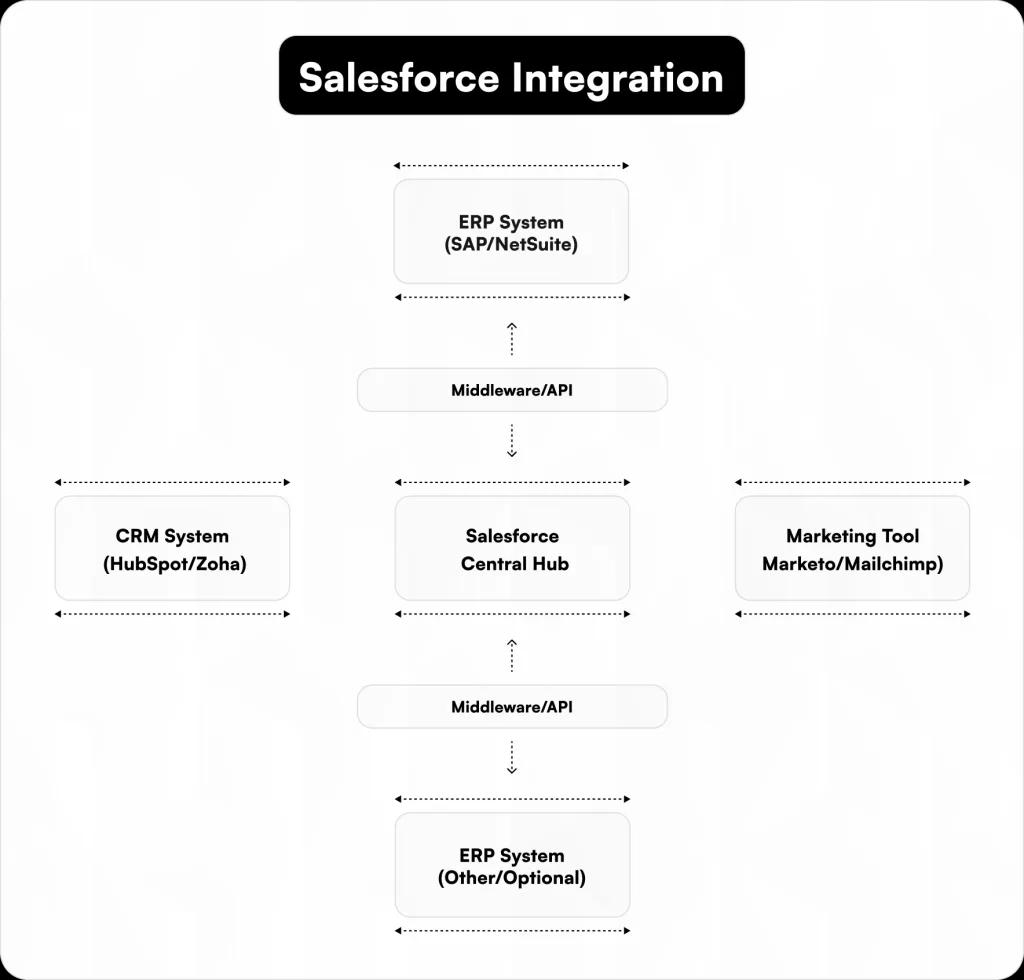
Integrating Salesforce With ERPs, CRMs, and Marketing Tools
Connecting Salesforce with systems like SAP, Oracle NetSuite, HubSpot, or Marketo bridges operational and customer data. This integration allows sales and marketing teams to see order histories, campaign performance, and client interactions in one dashboard. Using Salesforce Connect, Mulesoft Anypoint, or native APIs, businesses can synchronize data flow for better visibility and reporting accuracy.
Real-Time vs. Batch Integrations
Real-time integration instantly syncs data between Salesforce and connected systems. It is ideal for use cases like live order updates, instant lead assignment, or support ticket tracking. Batch integration, on the other hand, processes data at scheduled intervals, best suited for high-volume imports or financial reconciliations. The right method depends on your data frequency, volume, and business priorities.
Choosing the Right Approach: Middleware or APIs
Middleware solutions like MuleSoft, Dell Boomi, and Jitterbit act as connectors between Salesforce and other applications. It simplifies data mapping and synchronization. For custom setups, Salesforce REST and SOAP APIs give developers full control over integration logic and security layers. Choosing between middleware and APIs depends on whether your use case demands speed, scalability, or deep customization.
Common Salesforce Integration Challenges and How to Overcome Them
- Data duplication – Use upsert operations and unique identifiers to maintain clean records.
- Authentication failures – Implement OAuth 2.0 for secure and stable connections.
- API Limitations – Monitor usage with Salesforce governor limits and optimize API calls.
- Schema mismatch – Use data mapping tools to align field structures between systems.
- Latency issues – Choose real-time APIs or event-driven architecture for faster sync.
- Error handling – Build retry mechanisms and error logs to track failed operations.
- Security risks – Use encryption and field-level permissions to safeguard sensitive data.
User Training and Adoption Strategy
A Salesforce migration isn't just about moving data; it's about helping teams use the platform effectively. Even the best setup won't deliver results if users struggle to navigate dashboards, update records, or leverage automation. A strong training and adoption strategy ensures teams can maximize Salesforce's potential from day one, boosting productivity and accuracy.
Why Training Is Key to a Successful Salesforce Migration
Proper training reduces errors, accelerates user confidence, and improves data quality. Employees who understand Salesforce features are more likely to adopt best practices, correctly manage leads, and follow standardized workflows. Training also helps uncover gaps in business processes, guiding adjustments before full-scale adoption. This prevents bottlenecks and supports consistent performance across teams.
Training Users at Different Levels: Admins, Managers, Sales Reps
Not all users need the same level of training.
- Admins - Deep dives into configuration, workflow automation, and reporting tools. They maintain system health and troubleshoot issues.
- Managers - Focus on analytics, dashboards, and team performance tracking to make data-driven decisions.
- Sales reps - Hands-on practice with lead management, opportunity updates, and mobile app usage to drive efficiency and close deals faster.
Tailoring training by role ensures relevance and faster adoption.
Developing a Tailored Training Program for Your Team
A one-size-fits-all approach rarely works. Start with a skills assessment to identify gaps. Combine hands-on exercises, video tutorials, interactive sandbox sessions, and reference guides. Schedule follow-ups for Q&A sessions and refresher courses. Tracking completion and monitoring post-training performance helps fine-tune your program and identify where extra support may be needed.
Promoting User Adoption: Change Management Strategies
Encouraging adoption requires clear communication and visible benefits.
- Highlight time-saving features like automation and bulk updates.
- Share success stories within the organization to motivate teams.
- Offer ongoing support channels such as internal chat groups or help desks.
- Celebrate milestones and achievements to reinforce adoption behavior.
- Gather feedback continuously to adjust processes and address pain points.
A structured adoption plan reduces resistance, increases engagement, and makes Salesforce an integral part of daily operations.
Salesforce Migration Testing and Validation
Testing and validation are crucial steps in a Salesforce migration. Moving data and workflows from legacy systems to Salesforce can introduce errors or inconsistencies if not carefully checked. Comprehensive testing verifies that all data, customizations, and processes work as expected, helping teams maintain accuracy, avoid downtime, and get the most value from the new CRM environment.
Why Testing Is Non-Negotiable
Skipping testing can result in data loss, broken workflows, and user frustration. Rigorous testing helps:
- Catch mapping errors between legacy and Salesforce fields
- Identify workflow and automation failures
- Confirm reports, dashboards, and analytics display correct data
- Prevent duplicate or incomplete records from entering the system
- Maintain smooth business operations post-migration
Testing keeps your Salesforce environment reliable and builds user confidence.
Key Areas to Test During Salesforce Migration
- Data Accuracy: Verify field values, relationships, and record counts match the source system.
- Custom Objects and Fields: Ensure all custom elements function as intended.
- Workflows and Automation: Test approvals, triggers, and process builders for correct execution.
- Reports and Dashboards: Confirm metrics, filters, and calculations reflect migrated data.
- User Access & Permissions: Validate profiles, roles, and sharing rules to secure sensitive data.
Automating Testing Processes
Automation reduces manual effort and increases coverage. Tools like Selenium, Provar, or Salesforce DX allow testing of data migrations, workflows, and UI elements systematically. Automated scripts can run multiple test cases, detect errors faster, and generate logs for tracking issues. This approach saves time and increases confidence in a successful migration.
Validating Data Integrity and Application Functionality
Post-migration, cross-check records using SOQL queries, validation reports, and sample data testing. Verify that business-critical functions—like opportunity tracking, lead assignment, and campaign automation—operate as expected. Regular audits, combined with testing logs, help catch inconsistencies early and maintain Salesforce reliability for ongoing operations.
Post-Migration Support and Maintenance
Once your Salesforce migration is complete, the real work begins. Post-migration support focuses on monitoring system performance, resolving issues quickly, and optimizing workflows for long-term efficiency. Continuous maintenance keeps your Salesforce environment stable, secure, and aligned with evolving business needs—helping your team stay productive and data-driven after go-live.
Monitoring and Managing Salesforce Post-Go-Live
After deployment, it's crucial to track how Salesforce performs under real-world conditions.
- Use Salesforce Health Check to review security settings and configuration gaps.
- Monitor API usage, data storage, and user activity through the setup dashboard.
- Set up email alerts and audit logs to flag integration or automation errors early.
- Proactive monitoring helps detect performance slowdowns or workflow bottlenecks before they affect users.
Troubleshooting and Issue Resolution
Even well-planned migrations can face unexpected issues post-launch.
- Identify and fix data sync errors using debug logs and field history tracking.
- Handle permission conflicts by auditing profiles and sharing rules.
- Address integration lags through API call monitoring and middleware health checks.
- Creating a ticketing system and documentation repository speeds up resolution and keeps support structured.
Regular Updates and Salesforce Releases
Salesforce rolls out three major updates annually. Staying current helps you leverage new features while avoiding compatibility issues.
- Test updates first in a sandbox environment before applying them to production.
- Review release notes and impact areas for integrations or automation flows.
- Schedule minor maintenance windows to apply changes with minimal disruption.
Performance Monitoring and Optimization
Ongoing optimization keeps Salesforce fast and reliable.
- Use Optimizer App and Lightning Usage App to track system performance.
- Review page load times, data query speeds, and automation efficiency.
- Archive old records or attachments to improve storage and query response times.
- Regular analysis helps maintain peak performance and a seamless user experience.
Salesforce Migration Risks and Mitigation Strategies
Every Salesforce migration carries potential risks, from data loss to extended downtime. Identifying these challenges early and planning around them helps maintain data integrity, system stability, and business continuity. A well-structured risk mitigation strategy keeps your migration process smooth, predictable, and aligned with organizational goals.
Common Migration Pitfalls and How to Avoid Them
Migrations can fail when teams underestimate data complexity or skip pre-validation.
- Incomplete data mapping leads to missing or mismatched fields.
- Unclean legacy data causes duplication or import errors.
- Unplanned dependencies break integrations and workflows.
- Mitigation starts with sandbox testing, data profiling, and a migration checklist to validate all objects, fields, and relationships before going live.
Minimizing Downtime During Migration
Downtime impacts both productivity and customer experience.
- Schedule migration during low-traffic hours or weekends.
- Use incremental or phased migration to move data in smaller batches.
- Apply parallel processing for faster transfers.
- Real-time monitoring of system logs and job queues helps identify bottlenecks and reduce disruption to active users.
Data Loss Prevention Techniques
Data integrity is the backbone of any migration.
- Take full database backups before each migration stage.
- Validate data accuracy using checksum verification and record counts.
- Use Salesforce Data Loader, Dataloader.io, or Talend for controlled imports.
- Implement rollback plans and maintain snapshots to restore previous versions instantly if something goes wrong.
Risk Management Plans
A structured risk management plan adds predictability to the migration.
- Define potential risk scenarios—like API limits, user access issues, or integration failures.
- Assign ownership and mitigation protocols to each risk.
- Set up real-time alerts through Salesforce Event Monitoring.
- Post-migration, conduct QA validation and UAT testing to confirm that the new environment is stable and fully functional.
Case Studies and Success Stories
Real-world Salesforce migrations success stories indicate the impact of thoughtful planning and execution. From seamless transitions to valuable lessons learned, these stories highlight the importance of strategy, data integrity, and user adoption. By assessing both successes and challenges, businesses can gain insights to navigate their own Salesforce migration journey effectively.
Real-World Salesforce Migration Success Stories
Yoga democracy - Completed a full-stack migration to Salesforce Commerce Cloud in just 6 weeks, resulting in an 86% increase in site speed and a significant reduction in app dependencies. (Salesforce)
Healthcare provider - Successfully split its Salesforce organization to accommodate a new business unit, maintaining operational continuity and meeting all project deadlines. (Demand Chain)
Brokerage firm - Migrated millions of customer records to a single Salesforce instance post-acquisition, ensuring compliance and a seamless customer experience through rigorous testing. (iceDQ)
Electric vehicle manufacturer - Transitioned from Salesforce to HubSpot CRM without data loss or downtime, demonstrating effective cross-platform migration strategies. (unlimitedtechsolutions.com)
Salesloft - Led a meticulous Salesforce migration, consolidating data across platforms from recently acquired companies, utilizing sandbox environments for user acceptance testing. (tango.ai)
Lessons Learned From Failed Salesforce Migrations
Skipping full-volume dry runs - Overlooking comprehensive testing can lead to unexpected issues during migration. (LinkedIn)
Underestimating external dependencies - Hidden dependencies can complicate data migration and integration processes. (Salesforce Ben)
Lack of user training - Insufficient training can result in low user adoption and inefficient use of the new system.
Inadequate data cleansing - Migrating unclean data can perpetuate existing issues and hinder system performance.
Rushed timelines - Compressing migration schedules can lead to overlooked details and increased risk of failure.
Key Takeaways From Industry Leaders
Pilot first - Start with a pilot migration to identify potential issues before full-scale implementation.
Data quality is crucial - Clean and accurate data is foundational for a successful migration.
User involvement: Engage end-users early to ensure the system meets their needs and to promote adoption.
Continuous testing - Implement ongoing testing throughout the migration process to catch and resolve issues promptly.
Post-go-live support - Provide robust support after migration to address any emerging challenges and optimize system performance.
Driving Ongoing Value From Salesforce
Long-term Salesforce success depends on how well your system adapts as your business evolves. By maintaining clean data, fine-tuning automation, and adopting new Salesforce features, you can keep operations efficient and responsive. Regular audits, advanced analytics, and continuous optimization help teams stay aligned with goals—turning Salesforce into a growth engine that keeps delivering measurable business value.
Salesforce Success Checklist
- ✅ Review and clean data quarterly to maintain accuracy
- ✅ Audit automation and workflows every six months
- ✅ Stay updated with Salesforce seasonal releases
- ✅ Expand dashboards and reports using real-time analytics
- ✅ Train users on new features and updates
- ✅ Monitor integration performance regularly
- ✅ Align CRM metrics with evolving business objectives
Keeping Salesforce Aligned With Your Business Growth for Years to Come
Long-term success with Salesforce comes from consistent refinement, not a one-time setup. As your teams, data, and customer base grow, your CRM must evolve too. The leading Salesforce migration company regularly reviews workflows, optimizes integrations, and uses analytics to guide decisions, helping you maintain a system that truly supports business goals. With proactive management, Salesforce stays relevant, scalable, and ROI-driven for years to come.

Written by
Pratik Kantesiya
AI Engineering Lead
Pratik leads AI engineering at Agile Infoways, where he architects production AI systems for enterprises across healthcare, BFSI, and logistics. He writes about practical AI delivery — what works, what does not, and what most teams miss between proof-of-concept and production.