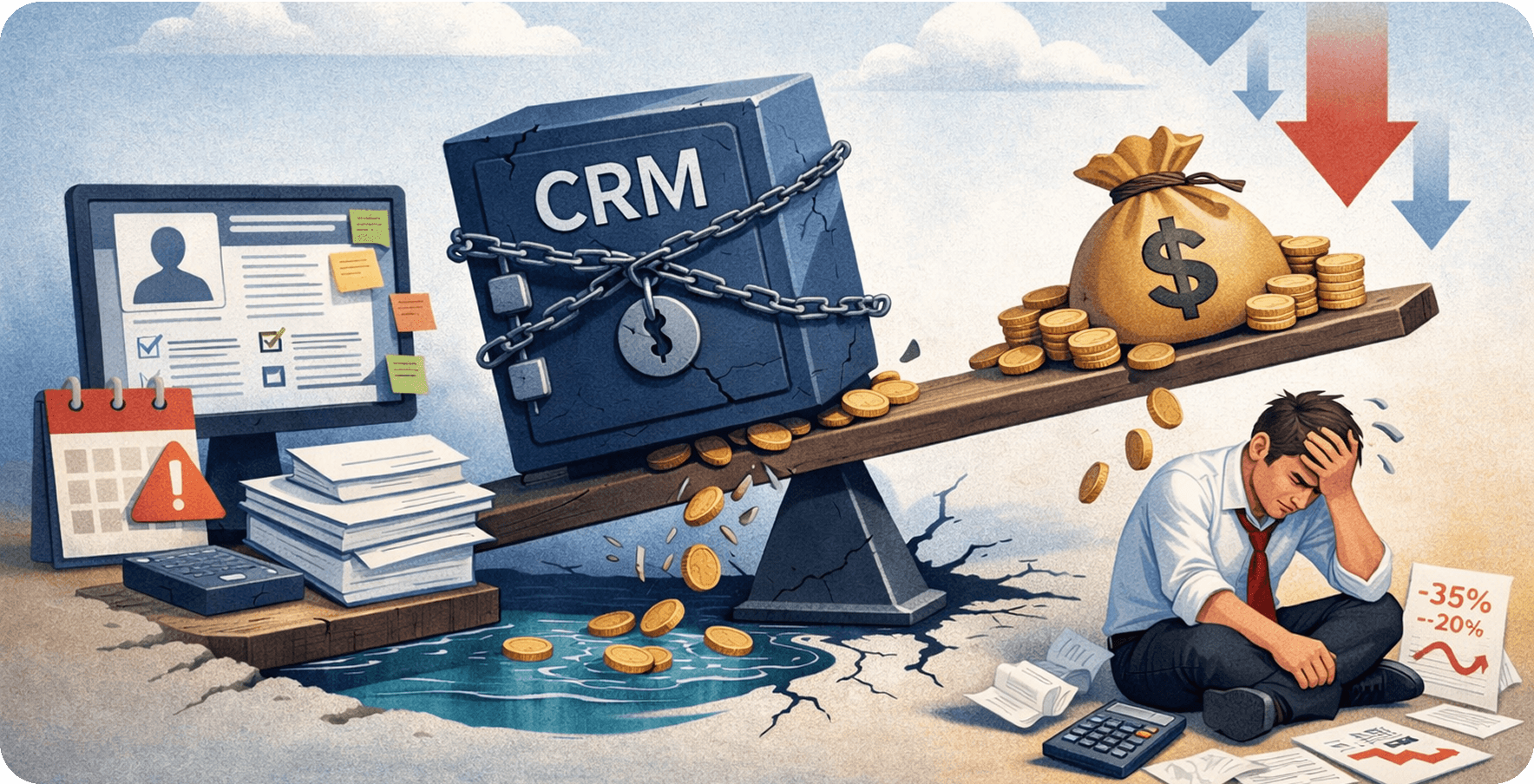
Quick summary: Scaling a small business without the right CRM is like building on quicksand. This guide explains what Salesforce delivers every day, how to select the right implementation partner, how to migrate without disruption, and which ROI metrics show that the investment is working.
Growth is the goal, but unmanaged growth is where small businesses quietly stall. Juggling spreadsheets, siloed inboxes, and disconnected apps may have worked so far, but those tools rarely support the next stage. According to the Salesforce State of the Connected Customer report, 88% of customers say the experience a company delivers matters as much as its products.
That is a high bar, and Salesforce for small businesses is designed to help organizations clear it. Businesses get a single, intelligent platform for managing customer touchpoints, automating manual work, and making better decisions without building an unnecessarily complex technology stack.
This guide explains what Salesforce CRM for small businesses delivers day to day, how to choose the right implementation partner, what a seamless migration looks like, and which ROI measures decision-makers need before approving an investment.
The growth trap: why scaling without the right CRM stalls fast
Every fast-growing small business eventually hits a wall, often just when momentum is building. The culprit is rarely the team; it is usually the tools. Understanding this breaking point and adopting a proactive CRM strategy can pay off sooner than many operators expect.
When manual processes start costing you deals
Tracking leads in spreadsheets, chasing follow-ups from memory, and copying data between systems is not merely inefficient—it leaks revenue. When the CRM is a shared spreadsheet, deals can quietly fall through the cracks.
Common manual-process failures include:
-
Lost follow-ups without automated reminders or task queues
-
Duplicate outreach when representatives contact the same prospect independently
-
Inaccurate pipeline forecasts built on incomplete or outdated data
-
Onboarding delays caused by manual handoffs between sales and service
-
No attribution showing which marketing investments produce closed deals
The hidden price tag of disconnected tools
Many small businesses run separate tools for email, helpdesk, billing, marketing, and analytics. The actual cost is not limited to subscriptions. It includes the hours spent synchronizing data, errors caused by duplicate records, and blind spots created when customer information lives in multiple systems.
A unified CRM eliminates silos and provides a single source of truth across customer interactions, deal stages, and support tickets.
Why small businesses cannot afford to wait
Forrester's Total Economic Impact study of Salesforce Sales Cloud examines the financial effects of a connected CRM. Every quarter without an effective system gives better-equipped competitors more time to close deals, retain customers, and scale intelligently. Small businesses need to establish this operational foundation before growth outpaces their processes.
What Salesforce CRM for small businesses actually delivers
Feature lists rarely show what a platform does during an ordinary workday. The real test is whether a sales representative working a hot deal and a support team managing several tickets can access the same account context and act quickly.
One platform for the entire customer journey
Salesforce consolidates the sales pipeline, customer history, support cases, email interactions, and marketing campaigns into a live platform. From first contact to closed-won and renewal, sales, service, and marketing teams view the same customer record in real time.
This eliminates duplicated outreach, missing context, and uncertainty about whether someone followed up. A unified view keeps teams aligned throughout the customer lifecycle.
Automation that cuts busywork, not headcount
Salesforce automation tools such as Flow and Einstein AI reduce repetitive work. Organizations can assign leads by territory, trigger follow-up emails when deals change stages, escalate unanswered tickets, and synchronize data without manual intervention.
The outcome is straightforward: people spend more time selling and serving customers and less time on administrative work.
Real-time visibility leadership will use
Salesforce dashboards give decision-makers a live view of pipeline health, representative performance, customer satisfaction, and revenue forecasts. Leaders can identify at-risk deals, accounts needing attention, and the real trajectory of the next quarter without waiting for manually assembled reports.
Built to scale: Salesforce for small businesses at every stage
One of Salesforce's main advantages is that it grows with the business. Organizations can begin with core CRM capabilities and add products, workflows, users, and integrations as requirements become more sophisticated.
Start small and scale without re-platforming
Small businesses often start with core Sales Cloud capabilities such as contact management, pipeline tracking, and email integration. As operations grow, they can add Service Cloud for support, Marketing Cloud for campaigns, or Commerce Cloud for eCommerce while retaining the same customer-data foundation.
The platform scales vertically and horizontally, adding capabilities without discarding processes that already work.
Customization that fits your operations
Out-of-the-box Salesforce is powerful; a carefully customized environment can become a competitive advantage. The platform supports custom objects, fields, and automated workflows that mirror real sales stages, service escalation paths, and reporting hierarchies.
The organization does not need to distort its operations to fit a generic software template. Instead, Salesforce development services can configure the platform around how the team works. That distinction separates a tool people use from one they quietly avoid.
From startup-scrappy to mid-market-ready
The businesses that scale fastest are not always those with the largest teams; they often run the tightest systems. Salesforce can give a 15-person operation access to infrastructure typically associated with much larger organizations, including automated onboarding, account-based selling, territory management, and revenue forecasting.
When the foundation is built correctly, the platform accelerates with the business rather than working against it.
Choosing the right Salesforce development company in the USA
Purchasing Salesforce is only the first step. Implementation quality determines the return on investment. Choosing the right development company is therefore one of the highest-leverage decisions a growing business can make.
The right partner helps the organization launch quickly with a system employees actually use. The wrong choice can lead to a half-configured platform, low adoption, delayed timelines, and an exhausted budget.
In-house vs. certified partner: what the ROI math looks like
Hiring internally may appear less expensive until salary, benefits, ramp time, specialization, and turnover risk are included.
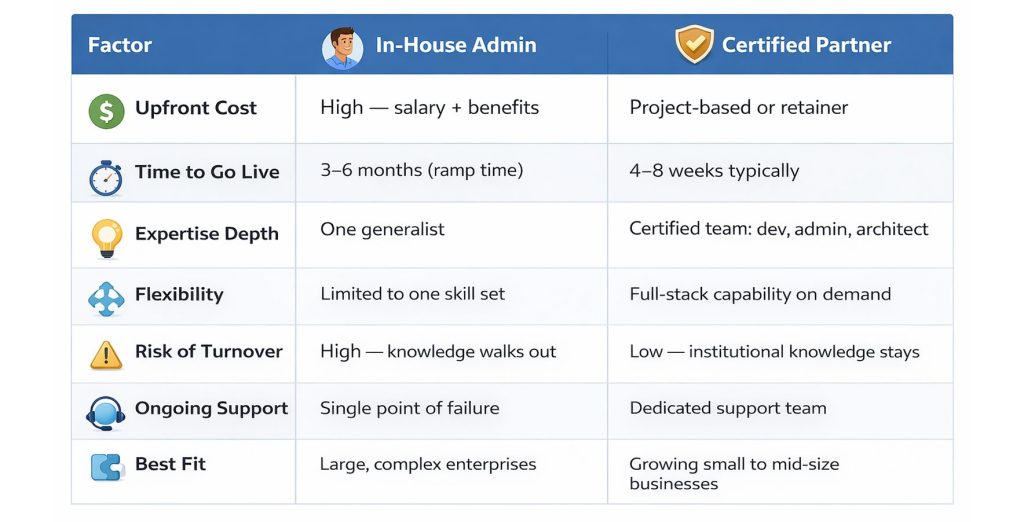 In-house Salesforce administrator versus certified partner ROI comparison
Five questions to ask before signing
Not all Salesforce partners offer the same depth. Before committing, ask:
-
How many implementations have you completed for organizations at our revenue stage and in our industry?
-
Who will work on the account day to day, and can we review their Salesforce certifications?
-
What does post-launch support include, and is it part of the project scope?
-
Can you provide client references we may contact directly?
-
How will you manage change and ensure our team adopts the platform?
What a strong implementation partner does
A strong Salesforce development company does more than configure software. It audits current sales and service workflows before creating fields, builds around how teams actually operate, trains each user role, and remains engaged after launch to iterate and expand the platform.
That is the difference between a vendor and a strategic partner. Businesses can also hire Salesforce developers when they need dedicated expertise embedded more closely within their delivery team.
A stress-free switch: what to expect from Salesforce migration services
Organizations moving from HubSpot, Zoho, Microsoft Dynamics, or spreadsheets often associate migration with risk. A structured approach makes it possible to move without disrupting daily operations, losing historical records, or leaving teams without access.
Leaving legacy systems without stopping operations
Downtime is the most common migration fear. A phased approach avoids it by moving data in parallel while the legacy system remains available. Teams begin testing Salesforce in a sandbox before final cutover. The old system stays accessible until stakeholders have validated the new environment.
Keeping data clean, complete, and migration-ready
Nothing exposes data-quality issues faster than migration. Before moving records, a professional team audits the existing data, removes duplicates, standardizes field formats, archives outdated records, and maps legacy fields to Salesforce.
This cleansing phase determines whether the organization launches with a trusted platform or spends the next six months correcting errors.
Timeline, milestones, and go-live success
A typical small-business migration may run for 6–10 weeks:
-
Weeks 1–2: Discovery and data audit
-
Weeks 2–4: Sandbox configuration
-
Weeks 4–6: Data migration and validation
-
Weeks 6–8: User acceptance testing
-
Weeks 8–10: Go-live and support coverage
Success means clean data, trained users, active adoption from day one, and no critical issues during the initial launch period.
ROI small businesses see after implementing Salesforce
Every business leader should ask what return the platform will produce. The answer depends on implementation quality, baseline performance, adoption, and the processes being automated.
Shorter cycles, higher close rates, and better retention
Salesforce's CRM ROI research reports improvements in areas such as sales revenue, win rates, and customer satisfaction. For a small business, those improvements appear through shorter deal cycles, automated follow-ups, better lead scoring, improved opportunity tracking, and service workflows that identify at-risk accounts earlier.
Scaling revenue without scaling headcount
Salesforce automation, Einstein AI, Flow, and custom logic can manage tasks that would otherwise require additional staff. Lead routing, renewal reminders, quote generation, case escalation, and onboarding workflows run automatically in the background.
This creates an important scaling lever: the team can increase output without adding headcount at the same rate as revenue.
When the investment begins paying for itself
Many small businesses begin seeing measurable improvements within three to six months of a well-executed implementation. Indicators include:
-
Sales representatives spending more time on deals and less on administration
-
Pipeline forecasts moving closer to actual results
-
Customer response times decreasing across support and sales
-
Duplicate records and data-entry errors falling substantially
-
Marketing connecting campaign spending directly to closed revenue
-
Leadership no longer relying on manually compiled reports
-
New-hire onboarding becoming faster
-
Service teams identifying at-risk accounts earlier
-
Revenue per representative increasing without equivalent team growth
Frequently asked questions
Is Salesforce too complex for a small business?
No. Salesforce for small businesses can start with a focused set of capabilities and expand over time. The implementation should expose only the features and complexity the organization currently needs.
How long does it take to see a return?
Many businesses begin seeing measurable improvements within three to six months when implementation and adoption are handled correctly. Faster deal cycles, reduced manual overhead, and better retention contribute to the return.
Will the team actually adopt it?
Adoption depends heavily on implementation. A capable partner builds workflows around real operations, trains each user role, and creates dashboards that help employees complete daily work. Intuitive design drives adoption more effectively than a forced rollout.
What happens to existing customer data?
Migration services include data auditing, deduplication, field mapping, and validation before launch. Teams should retain access to historical records throughout the process, and no information should move without validation.
Can Salesforce connect to existing tools?
Yes. Salesforce offers prebuilt integrations through AppExchange and APIs for custom connections. Common platforms such as email, collaboration, accounting, marketing, and communications tools can integrate with the CRM.
Is a dedicated full-time administrator required?
Not always. Many growing businesses manage ongoing Salesforce requirements through a part-time administrator, dedicated developer, or managed-services arrangement. The right model depends on customization depth, user count, release frequency, and internal ownership needs.
The bottom line: is Salesforce right for your business now?
If the team loses deals to disorganization, spends hours on manual processes, or makes strategic decisions without reliable data, a modern CRM foundation is worth serious consideration. Salesforce for small businesses is not a luxury reserved for large enterprises. It is operational infrastructure that can help smaller organizations grow faster, serve customers better, and compete without adding headcount at every stage.
Salesforce CRM gives leadership the pipeline visibility, customer information, and automated workflows needed to make better daily decisions. Whether implementing from scratch or migrating from a legacy platform, the right foundation separates businesses that scale from those that stall.
Success ultimately comes down to implementation quality. Partnering with the right Salesforce development company ties platform capability, process design, migration, adoption, and long-term optimization together. The businesses winning are not always the largest; they are often those running the strongest systems.

Written by
Pratik Kantesiya
AI Engineering Lead
Pratik leads AI engineering at Agile Infoways, where he architects production AI systems for enterprises across healthcare, BFSI, and logistics. He writes about practical AI delivery — what works, what does not, and what most teams miss between proof-of-concept and production.