Quick summary: A Salesforce integration partner helps businesses unify data across systems for smarter decisions. But which model works best: point-to-point, hub-and-spoke, or ESB? This guide explores integration architectures, synchronous and asynchronous timing, capabilities such as Streaming API and Salesforce Connect, popular application integrations, common pitfalls, and proven strategies for a seamless Salesforce integration journey.
The digital world is evolving at an unprecedented pace, creating new opportunities and new complexities. Businesses manage applications built with different technology stacks, each with unique integration needs. The challenge is not merely connecting systems; it is ensuring that they function together to support innovation, agility, and long-term success.
Salesforce integration services remove much of that complexity. Whether an organization works within the Salesforce ecosystem or connects third-party solutions, a proven integration strategy creates a unified, intelligent, and scalable digital foundation.
Integration goes beyond technology. It connects data, processes, people, and organizations so they can work together more effectively. When integrations are implemented correctly, operations become more efficient, unnecessary steps disappear, and productivity improves.
A leading Salesforce integration company aligns the different parts of an organization around shared information and goals. Integration also fosters collaboration, removes barriers that slow progress, and makes organizations more adaptable and resilient.
Don't miss this: 2025—the latest guide for beginners on Salesforce development services
Significance of Salesforce integration for businesses
Salesforce managed integration provides extensible, out-of-the-box capabilities during setup, lifecycle events, and technical operations. Clients can focus on business processes and scope while the integration foundation supports end-to-end value.
Salesforce integration unifies customer, sales, financial, and operational data across systems, eliminating silos that create inefficiency. By connecting Salesforce with ERP, HR, marketing, or specialized applications, organizations gain accurate, synchronized records, reduce duplication, and streamline workflows.
Modern enterprises rely on diverse CRMs, ERPs, communication platforms, and analytics tools that rarely operate together natively. A Salesforce integration partner bridges this gap through APIs, middleware, and connectors, enabling real-time synchronization and automation.
This reduces manual intervention, improves reporting accuracy, and accelerates decisions. Giving every team access to consistent data strengthens customer experiences while optimizing IT resources for long-term scale.
Salesforce integration types and architectures
The right integration architecture depends on business size, complexity, governance, and scalability requirements. The most common models are point-to-point, hub-and-spoke, and Enterprise Service Bus. Each determines how data flows between Salesforce and external applications and directly affects performance, error handling, and maintainability.
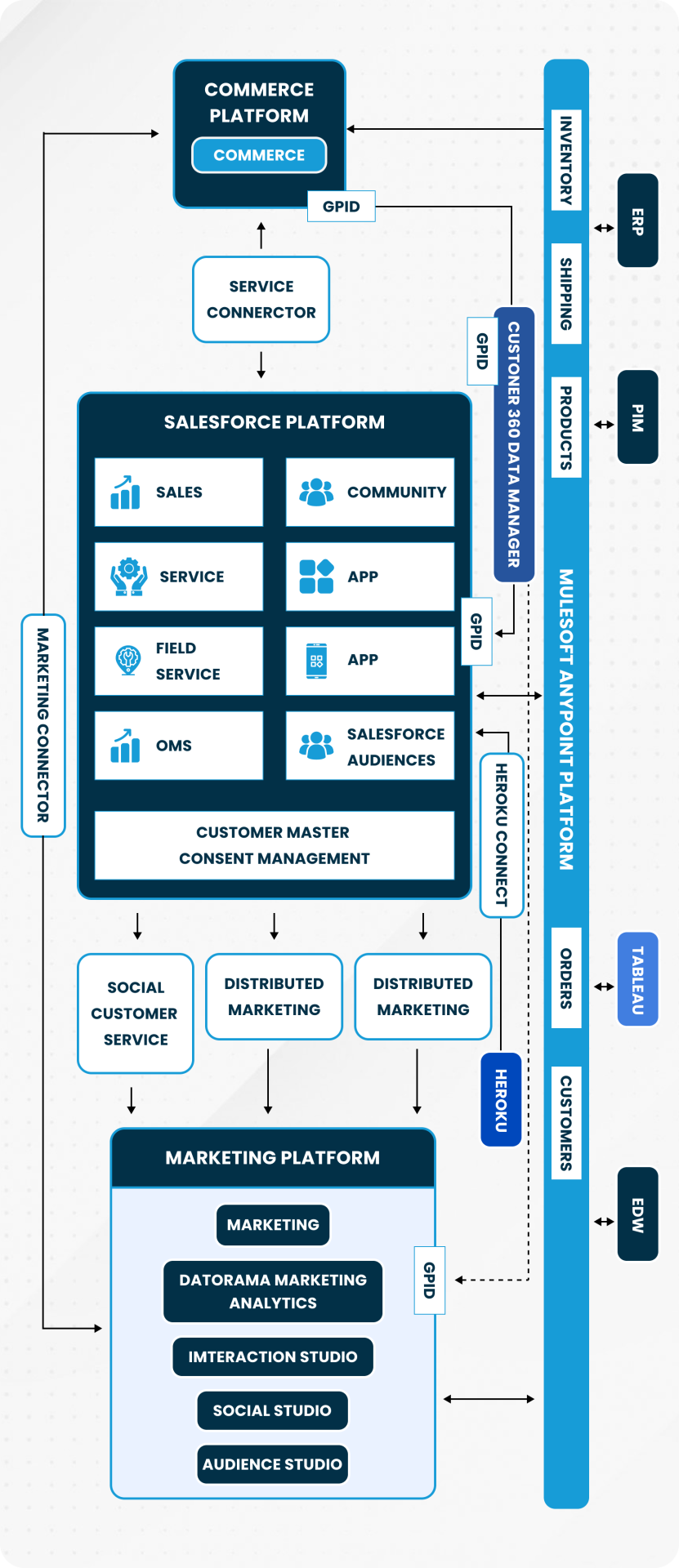 Salesforce outbound-message integration architecture
Point-to-point integration
Point-to-point integration connects Salesforce directly with another application through APIs or connectors. Each system communicates independently, making it quick to establish small-scale connections such as linking Salesforce with one marketing tool.
Pros
- Straightforward for two-system connections
- Lower initial development cost
- Fast data exchange through direct APIs
- Minimal infrastructure requirements
- Useful for limited integration needs
Cons
- Becomes difficult to manage as systems increase
- Higher maintenance from multiple independent connections
- Limited centralized monitoring
Hub-and-spoke integration
Hub-and-spoke integration introduces middleware or an integration platform as a central hub. Each application connects to the hub rather than maintaining multiple direct connections. The hub orchestrates data flows, transformations, and monitoring.
Pros
- Centralized integration management
- Reduced data redundancy and errors
- Easier scaling as applications increase
- Better troubleshooting and monitoring
- Support for synchronization and automation
Cons
- Higher setup and licensing costs
- Dependency on hub availability
- Requires skilled implementation resources
Enterprise Service Bus integration
An Enterprise Service Bus provides a service-oriented architecture in which Salesforce and other applications communicate through a centralized bus. The ESB standardizes exchange, supports sophisticated routing, and orchestrates complex enterprise workflows.
Pros
- Supports complex enterprise integrations
- Scales for large data volumes
- Strong error handling and governance
- Supports synchronous and asynchronous communication
- Centralizes integration logic
Cons
- More expensive to implement and maintain
- Requires advanced technical expertise
- Can experience performance problems if poorly optimized
Key components and capabilities of Salesforce integration
Salesforce integration relies on timing categories and technical capabilities that define how information moves between Salesforce and external systems. Timing controls response behavior, while APIs, Apex, Salesforce Connect, and Heroku Connect address different integration scenarios.
Timing categories
Synchronous integration executes requests in real time and is suitable for critical interactions such as payment authorization or inventory validation. It provides immediate responses and clear error visibility.
Asynchronous integration processes requests in the background. It supports high volumes and event-driven workflows while reducing system load and preserving responsive user interactions.
Capabilities
REST API uses lightweight JSON and HTTP methods to integrate Salesforce with web and mobile applications. It supports create, read, update, delete, and real-time query operations.
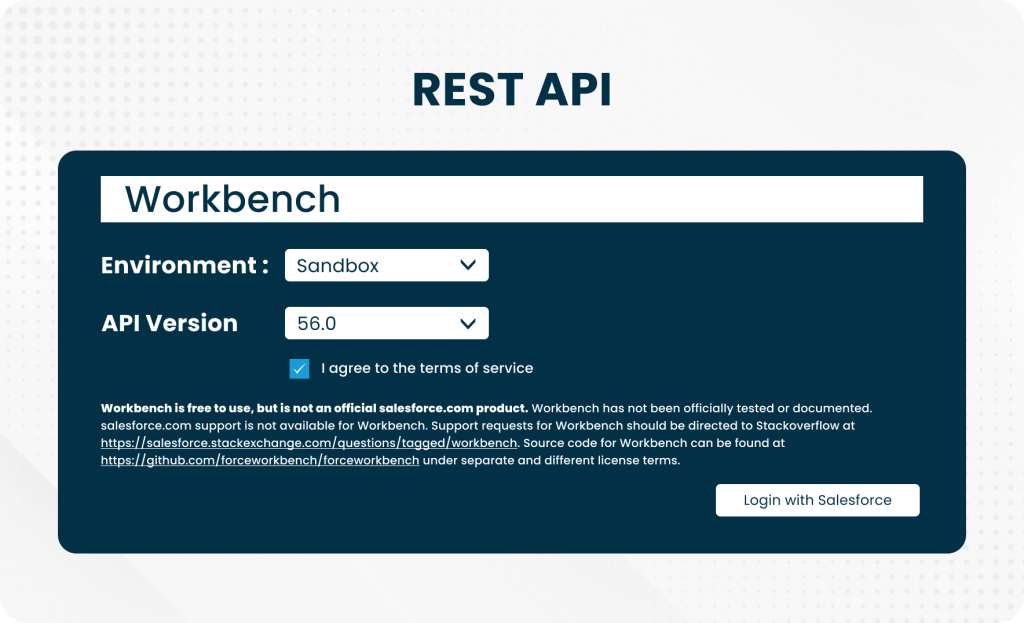 Salesforce REST API integration
REST API benefits
- Lightweight and fast for modern applications
- Straightforward JSON implementation
- Scalable for web and mobile solutions
- Reduced integration complexity
- Real-time data access
Bulk API is optimized for asynchronous operations on large datasets. It groups requests and can process millions of records, making it important for migration, synchronization, ETL, and analytics.
Bulk API benefits
- Efficient handling of large datasets
- Reduced API-call overhead
- Support for common bulk formats
- Well suited to migration and ETL
- Improved consistency across systems
Streaming API provides real-time event notifications when Salesforce data changes through PushTopics, Platform Events, or Change Data Capture. It broadcasts updates instead of requiring external systems to poll continuously.
Streaming API benefits
- Real-time synchronization
- No constant polling
- Support for Change Data Capture and events
- Reduced bandwidth use
- Improved system responsiveness
Apex is Salesforce's server-side programming language for custom logic, triggers, workflows, and web-service callouts. It is valuable when standard APIs and declarative capabilities cannot satisfy a requirement.
Apex benefits
- Custom integration logic
- Web-service callouts
- Support for complex workflows
- Error-management capabilities
- Automation of repetitive processes
Salesforce Connect exposes external data in Salesforce without importing it. External Objects and supported protocols let users report on and interact with information that remains in the source system.
Salesforce Connect benefits
- Real-time access to external data
- No record duplication
- Lower Salesforce storage requirements
- Unified dashboards and reports
- Better cross-system visibility
Heroku Connect synchronizes Salesforce data with Heroku Postgres and supports bidirectional updates between CRM and custom applications.
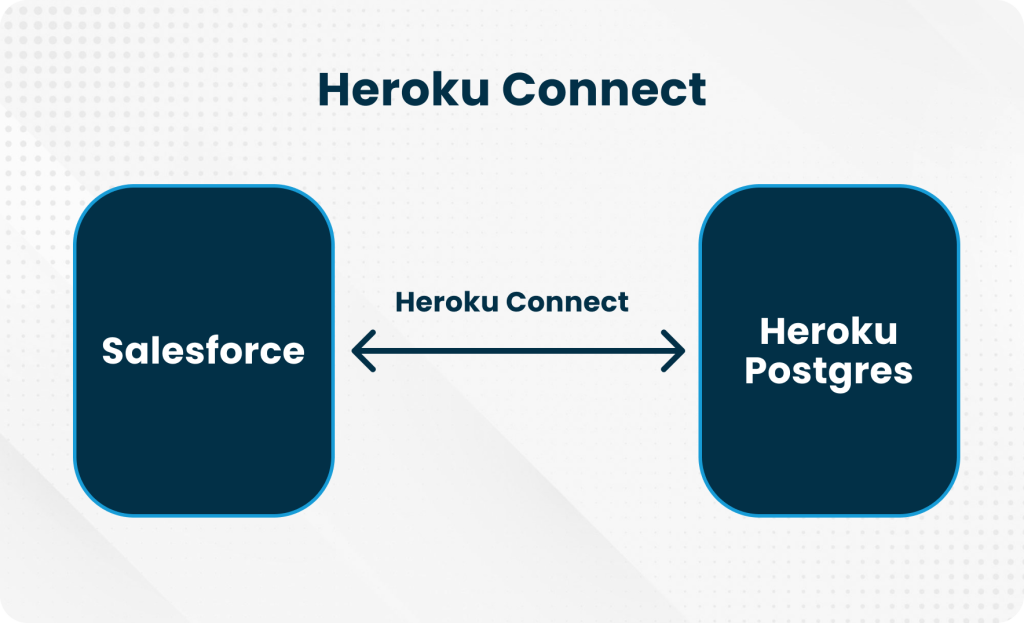 Salesforce Heroku Connect integration
Heroku Connect benefits
- Bidirectional synchronization
- Reduced middleware complexity
- Scalable application development
- Consistency across platforms
- Connected customer experiences
Outbound Messages send SOAP-based notifications from Salesforce to external systems in response to workflow events. They can update an ERP or notify finance when a deal closes without requiring extensive custom code.
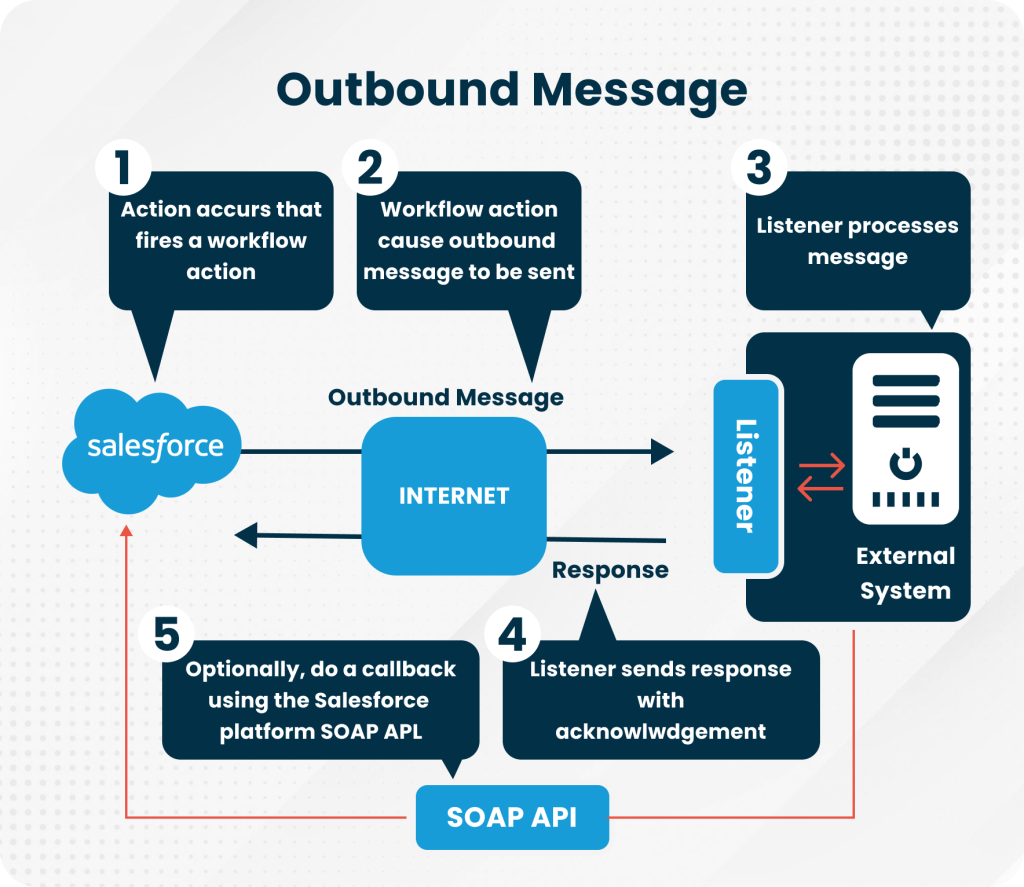 Salesforce outbound-message workflow
Outbound Message benefits
- Minimal custom code
- Event-driven automation
- Reliable system notifications
- Reduced integration complexity
- Streamlined cross-platform communication
Web-service callouts allow Salesforce to consume external REST or SOAP APIs. Salesforce can, for example, retrieve live shipping data from a logistics service, eliminating manual lookups and strengthening CRM as an operational hub.
Callout benefits
- Real-time external communication
- REST and SOAP support
- Automated cross-platform exchange
- More accurate records
- Less manual intervention
Salesforce integration patterns
Salesforce provides several integration patterns, and every application scenario has different reliability, latency, volume, and consistency requirements. Experienced integration developers evaluate each use case and select the pattern that offers the most stable, scalable, and maintainable outcome.
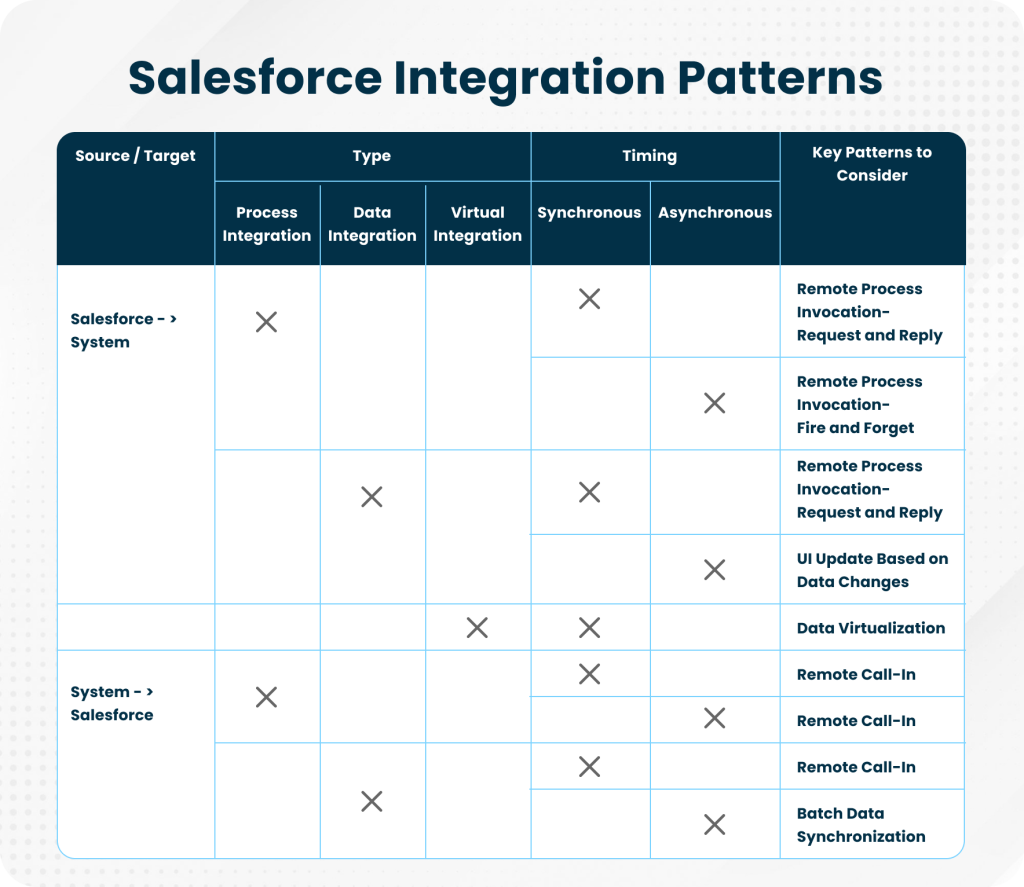 Salesforce integration patterns
Salesforce integration process in seven steps
1. Create the CRM data model
Define how objects, fields, and relationships connect in Salesforce. A structured schema supports accurate mapping with external systems, prevents redundancy, improves reporting, and reduces inconsistencies.
2. Build a CRM prototype
Use sandbox environments to validate workflows before full deployment. Simulate API calls, synchronization, transformations, and custom logic to find performance and functional problems early.
3. Import the data
Move legacy and third-party records through suitable tools such as Bulk API or Data Loader. Clean, map, transform, and reconcile data rather than simply copying source defects into Salesforce.
4. Connect the CRM
Establish authenticated and encrypted connections through APIs, middleware, or managed connectors. Define endpoints, error handling, retries, ownership, and monitoring.
5. Customize Salesforce
Use Apex, Flow, Lightning components, validation, and standard configuration to align Salesforce with business processes and integrated systems.
6. Test and launch
Validate data accuracy, behavior, performance, security, permissions, and failure recovery. Sandbox simulations and automated tests reduce unexpected production problems.
7. Provide post-launch support
Monitor integrations as APIs and business requirements evolve. Detect synchronization failures, manage incidents, prepare for releases, and optimize performance continuously.
Popular applications to integrate with Salesforce
Slack
Salesforce and Slack integration delivers deal updates, case progress, and approvals inside collaboration channels. Users can search records, share insights, and take supported actions without switching applications.
Benefits
- Real-time deal and case updates
- Automated approval workflows
- Salesforce record access in Slack
- Faster cross-team collaboration
- Less reliance on email
Google Workspace
Google Workspace integration connects Gmail, Calendar, and Drive with Salesforce. Emails can be logged, meetings synchronized with opportunities, and documents associated with records.
Benefits
- Automatic email and calendar logging
- Documents connected to Salesforce records
- Better lead and opportunity tracking
- Less manual data entry
- Unified communication history
HubSpot
HubSpot integration synchronizes marketing and CRM data. Leads captured by HubSpot can update Salesforce, while closed opportunities and pipeline changes inform marketing processes.
Benefits
- Unified marketing and sales pipeline
- Automated lead-to-opportunity synchronization
- Improved campaign personalization
- More accurate attribution
- Fewer duplicate records
Mailchimp
Mailchimp integration uses Salesforce data for campaigns and returns subscriber activity and campaign performance for analysis.
Benefits
- Automated campaign synchronization
- Email engagement visibility in Salesforce
- Better contact segmentation
- Fewer manual imports and exports
- Improved campaign ROI tracking
Jira
Salesforce and Jira integration connects customer support with development. Salesforce cases can create Jira issues, and engineering status updates can flow back to customer-facing teams.
Benefits
- Automatic case-to-issue creation
- Real-time status synchronization
- Faster customer-service responses
- Less duplicate communication
- Better transparency between teams
Asana
Asana integration connects projects and tasks to Salesforce opportunities and accounts. Teams can create and track delivery work from CRM events.
Benefits
- Tasks linked to CRM records
- Current task tracking
- Automated project creation from deals
- Reduced duplicate task management
- Better accountability
SharePoint
SharePoint integration centralizes document management. Contracts, proposals, and customer files remain in SharePoint but can be accessed through Salesforce records.
Benefits
- Centralized document storage
- SharePoint access from Salesforce
- Version control for critical files
- Secure team collaboration
- Lower Salesforce storage consumption
Drupal
Drupal integration synchronizes website forms, profiles, and content data with Salesforce. Leads captured on Drupal sites can enter CRM workflows automatically.
Benefits
- Automatic lead capture
- Real-time CRM updates
- Better content personalization
- No manual data transfer
- Improved campaign efficiency
GitHub
GitHub integration connects code repositories with Salesforce projects. Commits, pull requests, issues, and releases can be associated with delivery records.
Benefits
- Development artifacts connected to Salesforce
- Improved DevOps visibility
- Better collaboration between development and CRM teams
- Faster delivery cycles
- Simplified release management
Common Salesforce integration challenges and solutions
Data complexity and quality
Multiple systems often contain inconsistent, incomplete, or duplicate records. Poor data weakens analytics, automation, and decisions.
Solution: Profile and cleanse data, define validation, use deduplication and ETL tools, and establish ownership before integration.
Integration architecture and data mapping
Poor architecture and incorrect mappings cause mismatched fields, incomplete workflows, and broken dependencies.
Solution: Use appropriate middleware where needed and document object mappings, transformations, orchestration, systems of record, and reconciliation.
Security and compliance
Integrations expose sensitive data to additional applications and identities. Weak authentication, encryption, or monitoring creates regulatory and security risk.
Solution: Use OAuth, least-privilege access, encryption, Salesforce Shield where appropriate, audit logs, and continuous reviews.
Real-time data synchronization
Delayed synchronization creates outdated records, inconsistent customer experiences, and reporting gaps.
Solution: Use Streaming API, Change Data Capture, or Platform Events when immediate updates matter, and asynchronous processing where performance requires it.
API limitations
Salesforce API and governor limits can affect high-volume integrations.
Solution: Use Bulk API, caching, batches, backoff strategies, and monitoring. Design calls efficiently and plan capacity before launch.
User adoption
Even a technically sound integration produces weak returns if users reject the resulting workflow.
Solution: Provide guided onboarding, role-based training, clear interfaces, in-app prompts, and feedback-driven improvements.
Lack of planning and resources
Rushed integrations with unclear goals, insufficient governance, or inadequate capacity frequently fail.
Solution: Define a roadmap, allocate accountable resources, involve stakeholders early, prioritize use cases, and monitor outcomes.
Best practices for successful Salesforce integration
Define a clear integration strategy
Document objectives, scope, systems, data flows, architecture, non-functional requirements, ownership, and success measures before implementation. A clear strategy prevents unnecessary customization and reduces long-term complexity.
Use middleware and APIs effectively
Middleware such as MuleSoft or comparable integration platforms can standardize complex exchanges. Combine middleware with REST, Bulk, Streaming, and event capabilities according to volume, latency, and reliability needs.
Prioritize data governance and quality
Use data owners, common definitions, validation, deduplication, lineage, reconciliation, and monitoring to ensure connected systems produce reliable information.
Implement security and compliance measures
Use OAuth, encryption, least-privilege identities, Salesforce Shield where required, audit logging, credential rotation, and documented compliance controls.
Continuous testing and monitoring
Integration does not end at deployment. Continuous tests, sandbox simulations, health checks, alerts, and observability identify synchronization failures and performance degradation early.
Common use cases of Salesforce integration
Salesforce and ERP integration
Connecting Salesforce with SAP, Oracle, Odoo, or other ERP systems synchronizes orders, invoices, inventory, and financial information.
Advantages
- Real-time order-to-cash visibility
- Less manual data entry
- More accurate financial forecasts
- Better sales and finance collaboration
- Consistent reporting
Salesforce and marketing-automation integration
Connecting Salesforce with HubSpot, Marketo, or similar tools aligns campaign activity, lead nurturing, qualification, opportunities, and revenue attribution.
Advantages
- Unified marketing and sales funnel
- Automated lead nurturing
- More accurate ROI measurement
- Reduced data silos
- Better customer engagement
Salesforce and customer-support integration
Connecting service tools such as Zendesk or ServiceNow with Salesforce aligns tickets with customer records and gives sales and support a shared context.
Advantages
- Centralized customer history
- Faster ticket resolution
- Better service-to-sales collaboration
- Higher customer satisfaction
- Reduced operational complexity
Salesforce and collaboration-tool integration
Slack or Microsoft Teams integrations deliver deal, case, task, and approval information where employees collaborate.
Advantages
- Real-time updates
- Automated notifications
- Less context switching
- Faster approvals
- More efficient collaboration
Salesforce and ecommerce-platform integration
Shopify, Magento, and other ecommerce integrations synchronize customers, orders, products, and payments.
Advantages
- Real-time order synchronization
- Personalized marketing
- Unified purchase history
- Less manual reconciliation
- Scalable ecommerce operations
Salesforce and analytics or BI integration
Tableau, Power BI, and data-platform integrations combine CRM, ERP, marketing, and service data in governed analytical models.
Advantages
- Centralized dashboards
- More accurate forecasting
- Faster decisions
- Reduced data silos
- Better executive visibility
Salesforce and DevOps-tool integration
GitHub, Jira, and deployment-tool integrations connect development work with Salesforce projects and releases.
Advantages
- Streamlined development workflows
- Better release visibility
- Faster deployment cycles
- Stronger collaboration
- Reduced tracking complexity
Future trends and advanced Salesforce integration strategies
Businesses face both obstacles and opportunities, but lack of visibility and system integration remains a major pain point. There is a need for speed, while silos, outdated processes, and disconnected data slow progress.
Important trends include:
- Rising confidence in AI-powered customer service: Investment in trusted AI capabilities will continue increasing.
- AI-backed technology investment: Businesses will use AI to simplify repetitive work and improve customer engagement.
- Smart technology will fuel growth: Scalable tools such as Agentforce and Slack will expand organizational capabilities.
- AI will improve competitive reach: Smaller businesses will use intelligent automation to operate beyond their traditional scale.
- Data management is a higher priority: Clean, governed, organized data is becoming a prerequisite for AI and automation.
Salesforce integration is evolving beyond basic connectivity toward automation, real-time synchronization, event-driven architecture, and intelligent data management. Low-code tools, AI-powered automation, and mature API governance can simplify complexity while supporting secure, scalable integrations.
The right Salesforce integration company helps clients respond faster to problems and opportunities through a connected integration foundation. In an environment of constant change, staying agile and innovative is increasingly important.
The objective is clear: integrate to innovate.
Related articles
- Why enterprises choose Salesforce development companies over in-house teams
- How Salesforce development services drive business efficiency and ROI
- The strategic role of Salesforce development services in digital transformation

Written by
Pratik Kantesiya
AI Engineering Lead
Pratik leads AI engineering at Agile Infoways, where he architects production AI systems for enterprises across healthcare, BFSI, and logistics. He writes about practical AI delivery — what works, what does not, and what most teams miss between proof-of-concept and production.